Business Process Automation: A Guide for Companies in Romania
Contents
- What business process automation actually means
- Where Romania stands against the EU average
- Which business processes can be automated
- The technologies: what they are and when each one fits
- How to choose between a deterministic agent and an AI agent
- Two real case studies
- The stages of an automation project
- When automation doesn't pay off
- What drives the cost of an automation agent
- Common mistakes in automation projects
- Frequently asked questions about process automation
- Instead of a conclusion
What business process automation actually means
Tomorrow morning, someone at your company…
… will open the report from the payment processor, compare it against the invoices in the accounting software and mark them as paid, one by one.
Someone else, in sales, gets a request for a quote, looks up prices in the current price list, checks stock, works out the discount and types up the quote in Word.
Or maybe someone in the warehouse takes an order from email, enters it into the inventory system, then generates the shipping label on the courier's website.
None of them makes a single decision in any of those steps.
They do what was agreed needs doing, in the order it needs doing. The difference between them and a tool is that people get tired and make mistakes on the hundredth repetition.
That's the part automation takes over.
Data is pulled from the source, checked and put where it belongs, and when something doesn't fit the rules, the case goes to a person.
Automation isn't new technology.
What has changed in the last two or three years is how much it can take on. A program used to work only with neatly arranged data, in tables and fields. A handwritten email, a PDF sent by a supplier, an order with an unusual note were left to people. Now they can be read and understood.
That's also where the confusion in the market comes from.
Because you can automate far more than you could three years ago, many vendors have started promising you can automate anything. Technically, that's often true. But a process that happens three times a year, or one that calls for a judgment call every single time, has nothing to gain from automation, even if it's possible.
For a business owner, the useful question is what's worth automating in their company and where to start. The rest of this guide answers it.
Where Romania stands against the EU average
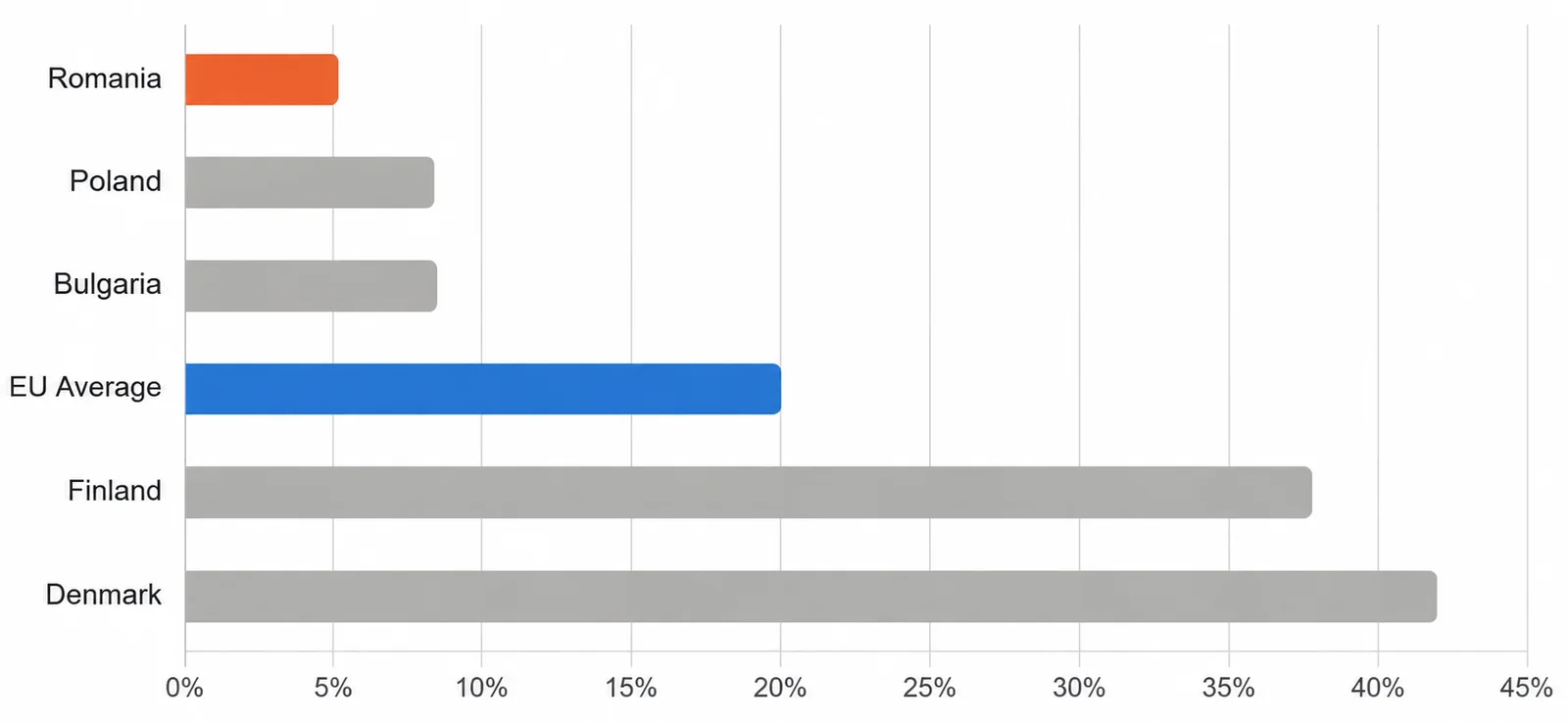
In 2025, 5.2% of Romanian companies with at least 10 employees were using artificial intelligence technologies. The European average was 20%. The figures come from Eurostat.
No one in the Union ranks below Romania. The next two, Bulgaria and Poland, sit around 8.5%. At the other end, Denmark is at 42% and Finland close to 38%.
Look at the trend, too. In 2021, Romania was under 2%. The European average went from 13.5% in 2024 to 20% in 2025, so the rest of the continent is speeding up.
Beneath the AI adoption figure sits an older one. CRM systems are used by fewer than 18% of Romanian companies, compared with a European average of 28.5%. Cloud services, by close to 25%, compared with 52.7%. Automation assumes you have systems for data to flow between, and many companies still don't have the systems.
There is, however, one number that doesn't square with the ones above. A KPMG study of Central and Eastern Europe found that more than 70% of employees say their organization uses AI tools.
The gap between 70% and 5.2% isn't a measurement error. Employees use ChatGPT or other tools on their own, for one-off tasks: summarizing a document, writing an email, drafting a quote. The company reports nothing, because officially it uses nothing.
For an owner, this means two things.
First, AI is already being used in their company, with no rules about what data leaves the company and no one checking the output.
Second, the time saved stays with individuals. One person writes an email faster. The process an order goes through, from customer to delivery, looks the same as it did three years ago.
The difference between the two matters for the rest of this guide. A tool helps one person work faster on their own task. An automated process connects the steps between several people and several systems.
And if you manufacture or deliver for companies in Western Europe, read those numbers again. The suppliers you compete with for the same contracts work in markets where adoption is four to eight times higher.
Which business processes can be automated
To make this useful, here are a few examples by department. Don't read them as a list of services. Treat them as a recognition exercise: somewhere in your company, one of the things below is being done by hand right now.
Finance and accounting
- Supplier invoices that get read and entered into the accounting software;
- Payments matched against issued invoices, using settlement reports from payment processors, couriers or marketplaces;
- Invoices marked as closed, one at a time;
- Expense reports;
- Month-end reports, pulled together from three or four different places.
Sales and quoting
- Quote requests that come in by email and have to be turned into quotes;
- Prices looked up in the current price list;
- Data entered into the CRM after every conversation;
- Following up on quotes that were sent and never answered.
Customer communication
- Order confirmations;
- Delivery status notifications;
- Reminders to customers who need to come back at a predictable interval;
- Answers to the same questions that come up every day: where's my order, when will it arrive, how do I return it.
Operations and documents
- Orders that come in by email or through the website and then get entered into the inventory system;
- Contracts and addenda filled in for every new customer, with the same fields;
- Documents that get generated, signed and archived.
HR
- Leave requests and employment certificates;
- Hiring paperwork for every new person;
- Screening résumés against clear criteria;
- Answers to internal questions that come up month after month.
Logistics and shipping
- Shipping labels generated with the courier;
- Parcel status, tracked and reported;
- Stock kept in sync between the inventory system and the online store.
The list above isn't complete, and it can't be, because every company has its own processes. But they all have four things in common, and those matter more than the list itself:
- They run often;
- The rules they follow can be written down;
- The data they need lives in a system, not just in an employee's head;
- And doing them doesn't take deep professional expertise. Anyone can do them with very little training.
When a process checks all four boxes, it's a serious candidate. When one is missing, the conversation gets more complicated, and we'll get to that below.
The technologies: what they are and when each one fits
When you ask for quotes, you'll get proposals that use different terms for things that look the same. Here they are one at a time, because each technology works on a different kind of data and behaves differently when your process, or the systems you work with, change.
RPA, or robotic process automation
A program that mimics what a person does in an interface: it opens the application, clicks, fills in fields, copies from one place to another. It's used when the system you work with doesn't allow a direct connection, usually older software. The upside is that nothing in the existing system has to change. The downside is serious: if the interface changes, even slightly, the program can't find where to click and stops.
Workflow automation
This covers the platforms that link applications through ready-made connectors, such as Make, Zapier or n8n. When an event happens in one application (a new order, an issued invoice, a submitted form), an action fires automatically in another. It works well for simple flows between popular applications. It gets complicated when you need your own rules, lots of exceptions, or a system that has no connector.
Deterministic agents
Programs that execute rules written in advance, with no artificial intelligence component at all. They take structured data, apply the rules and always produce the same result for the same data. They fit processes where the input is predictable: files exported from systems, tables, reports with a fixed format. Their advantage is that they behave the same way every time, and every action can be checked afterward.
AI agents
Programs that use language models to interpret messy information. They read a free-form email, pull the data out of an invoice in an unfamiliar format, sort a request by what it says. They cover ground that fixed rules can't reach, because the information arrives differently every time. On the other hand, they don't always produce identical results, so processes that depend on them need checks.
Deterministic agents and AI agents in the same process
In practice, many processes have both kinds of steps. The customer sends a free-form request, so the first stage needs interpretation. Once the data is extracted, the rest of the steps are fixed rules: check, calculate, enter, notify. A well-built process uses artificial intelligence only where it's needed and fixed rules everywhere else.
Other terms you'll hear, such as hyperautomation or intelligent process automation, describe exactly that combination, at a larger scale. If you want short definitions, you'll find them in our automation glossary.
KEY TAKEAWAY: When you get a quote, ask what kind of solution is behind it and why it was chosen for your process. A vendor who understood your process will answer directly. One selling a standard product will explain why their technology is the best, no matter what you asked.
How to choose between a deterministic agent and an AI agent
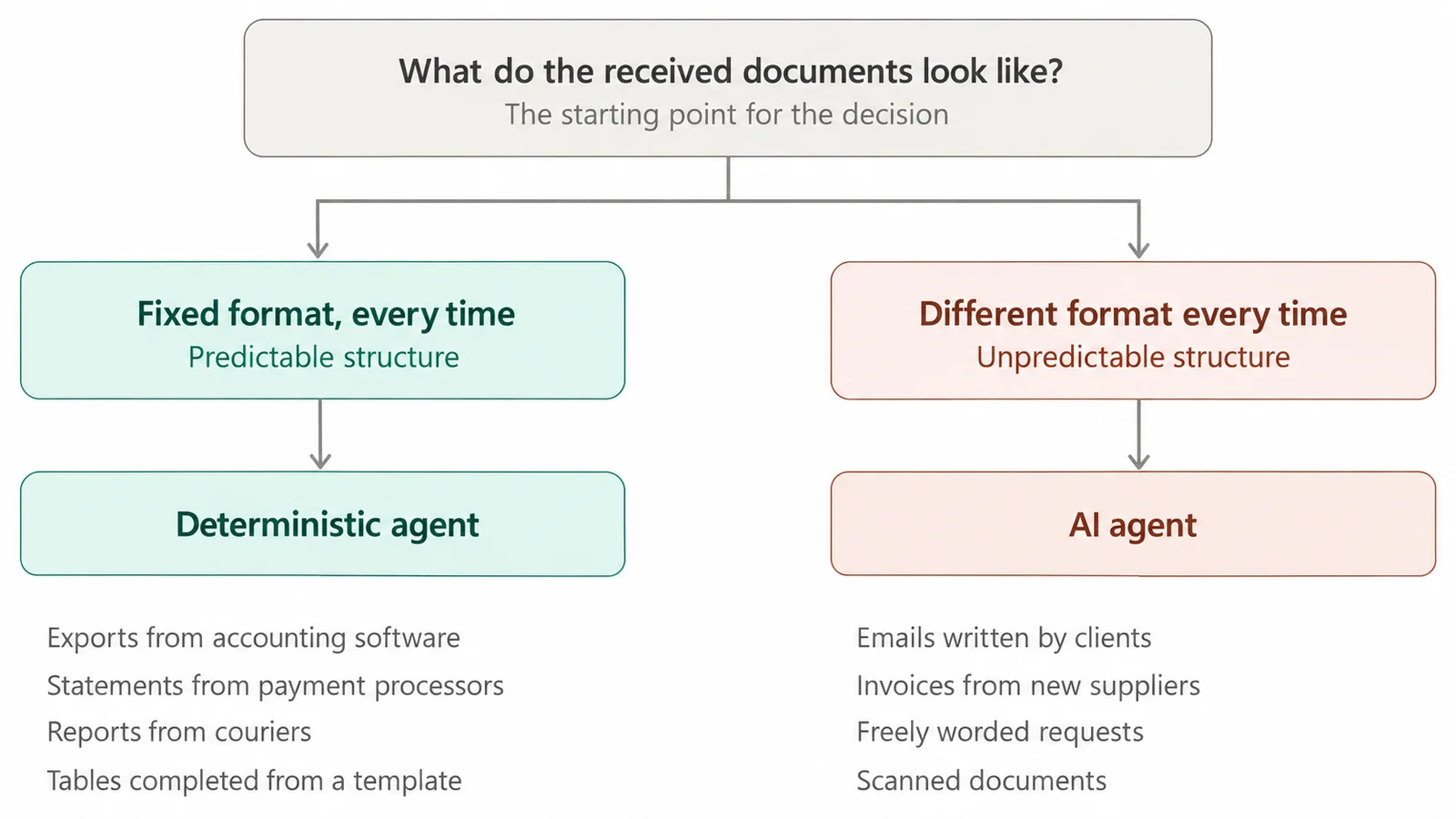
The choice isn't about budget, and it isn't about how modern the solution looks. It comes down to one thing: how predictable the documents and files the agent works with are.
When the agent receives files in a fixed format, the right choice is a deterministic agent.
A fixed format means the data looks the same every time. An export from the accounting software. A file from the payment processor, with the same columns in the same order. A courier report. A table filled in from a template.
Here the agent applies rules written in advance and produces the same result for the same data. It doesn't interpret anything, because there's nothing to interpret. And every action can be checked afterward, step by step.
Predictability matters most in processes where a mistake costs you directly: reconciliations, calculating amounts, compliance checks, generating legally binding documents. In a process like that, a result that varies from one run to the next is a problem, not a feature.
When the agent receives documents that look different every time, you need interpretation.
An email written by a customer. An invoice from a new supplier, with the information laid out differently on the page. A request that could mean three different things, depending on context.
Fixed rules fall short here, because you'd have to foresee every possible variation. An AI agent reads the content and pulls out what it needs, whatever form it was written in.
The price of that flexibility is that the result isn't identical every time. That's why processes built on interpretation need checks: the agent flags the cases it isn't sure about and sends them to a person instead of deciding on its own.
Most real processes have both kinds of steps.
A concrete example. A customer sends an order by email. The first step needs interpretation: which products they asked for, in what quantity, to which address. Once the data is extracted, the rest of the process is fixed rules: you check stock, calculate the price with their discount, generate the invoice, create the shipping label, send the confirmation.
A well-built process uses interpretation only in the step that calls for it and fixed rules everywhere else. Not the other way around.
To see where that line falls in your own process, you can describe it in the process automation audit. You get the steps labeled deterministic, AI or human, plus the risk points of each option.
Three practical consequences of the type of agent you choose
The first is about compliance.
The EU AI Act brings transparency, documentation and human oversight obligations for certain categories of systems. A deterministic agent, which contains no artificial intelligence component, doesn't fall under it. If you work with sensitive financial or legal data, that distinction has practical consequences.
The second is about verification.
In an internal or external audit, you need to be able to show what was executed and under which rule. A deterministic agent answers that question unambiguously.
The third is about expectations.
If your process requires the result to be identical every time and the vendor proposes a solution built on interpretation, you'll end up with complaints nobody saw coming.
Ask this in the first conversation: for my process, what type of agent do you propose, and why?
A vendor who works with both will explain what led to their choice. One who offers a single type will explain why their type is the right fit, whatever the process.
Two real case studies
So far we've talked about principles. Below are two processes we automated at the same company, Aquator Transilvania, a manufacturer of water filtration systems based in Florești, Cluj County. They're two different cases because they start from different reasons: one from an internal cost, the other from lost revenue.
Case 1: 118 hours a month lost to marking invoices
Aquator sells through its own store and through marketplaces. Money comes in through payment processors, couriers and sales platforms, each with its own settlement report in its own format.
The accountant took the settlement reports and marked invoices as paid, one by one, in the accounting software. That work took up 70% of her month, around 118 hours. Volume kept growing, and the company had reached the point where the only option seemed to be a second hire.
The process met every condition above: high frequency, rules that could be documented, data that already existed in systems, and the marking itself involved no professional judgment, just matching an amount to an invoice.
Now the agent takes the settlement reports and closes hundreds of invoices per minute. The accountant checks the result in about five minutes. She got back 118 hours a month for work where her professional training adds value to the business: reviewing the financial statements, analyzing the numbers, preparing the reports management uses to make decisions. And the company no longer needed the second person it had planned to bring in for invoice marking.
See the full case study for the agent that marks invoices as closed in the accounting software.
Case 2: reminders sent by hand that didn't reach every customer
A water filter needs replacing about every six months. A customer who doesn't get a timely reminder keeps using a spent filter without knowing it. The company loses the order the customer would have placed for a new filter, and the customer drinks unfiltered water, convinced the filter is still doing its job.
For a year, reminders were sent with human involvement, through an outside platform. Someone prepared the list, reformatted the phone numbers, uploaded it, wrote the message and scheduled it. Every customer got the same message on the same day, and some messages never arrived at all.
The Cicada automation agent connects to the marketplace, pulls the purchases, calculates for each customer when their filter will run out based on the product bought and the quantity, then builds a reminder schedule and sends the message shortly before that date.
Instead of one message for everyone, each customer is contacted at their own time. Nobody on the team has to step in anymore.
See the case study for the automation agent that turns one-time sales into recurring sales.
Time recovered and extra revenue
Both processes were repetitive and both ate up time. But the gain is different in kind.
In the first case, the company recovered 118 hours a month from work that could be automated and avoided a new hire.
In the second case, the gain is recurring revenue. Customers get the reminder before they run out of filter, so the replacement order is placed on time.
When you think about a process at your company, ask yourself which of the two categories it falls into. The answer tells you how urgent it is and what you'll compare after implementation to see the result.
Want to see which process at your company would be a good fit? Let's look at it together, in a no-commitment conversation.
The stages of an automation project
A project that turns out well goes through the same stages, whatever the size of the process. The order matters more than the speed.
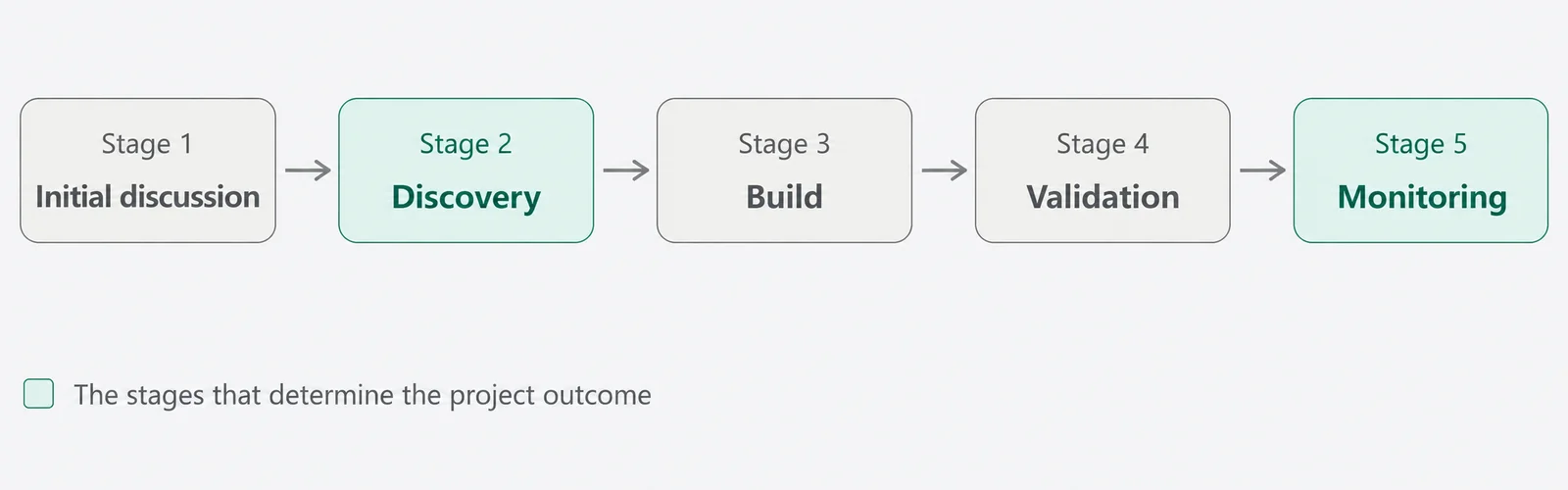
1. The first conversation
A conversation in which the vendor understands how you work and you understand what could be automated. By the end, you should know which processes are candidates and which aren't, without having signed anything.
2. Discovery: mapping the process
The stage where the process is documented the way it happens today, not the way it's supposed to happen. You sit down with the people who do the work now and write down every step, every rule and every exception.
Research on failed projects shows that a good share of failures come from choosing the wrong processes, or from processes that didn't work well even when done by hand, where automation just carried the problems over.
Exceptions are the most important part of this stage. The supplier who sends invoices in a different format. The customer with terms negotiated three years ago. The order with a handwritten note. In a real process, situations like these aren't rare. If they aren't documented now, they show up in production, at your expense.
At the end of this stage, you should get everything that was agreed in writing: what the agent does, on which cases, under which rules, and what happens in unusual situations. That document goes into the contract.
3. The build
The agent is built on the mapped process, the integrations with your systems are set up and the data is synced. How long it takes depends on how many steps the process has and how many systems it connects to.
4. Testing and validation
The agent runs on real data from your company, and the result is checked step by step: did it pick up the information correctly, did it apply the agreed rules, did it produce what it was supposed to. Wherever something doesn't match, it gets adjusted.
This stage ends when you confirm the agent works as specified in the contract. Without criteria written down in advance, validation comes down to impressions, and the project drags on forever.
5. The agent goes live and is monitored continuously
The agent takes over the process. From here on, responsibility for keeping it running stays with the vendor.
We, for example, treat the period after implementation as part of the service, not an add-on. The agent is monitored around the clock by the technical team, and the systems it connects to change over time, so we keep an eye on the integrations and adjust them as we go, before any of it reaches you. You have a dedicated account manager who knows your process and whom you contact directly, with no tickets and no need to explain the background every time.
You also get access to our platform, where you can see what the agent processed, in what volume and with what result.
What separates successful projects from the rest
Of the five stages, two carry the most weight: the mapping at the start and the monitoring at the end. The first decides whether the agent does the right thing. The second decides whether it's still doing it six months from now.
When you compare quotes, check whether both are included and how they're described. A vendor who skips discovery is selling you a demo. One who leaves monitoring to you is selling you half a service.
When automation doesn't pay off
The most common mistake in automation is treating it as a technical decision. It's a financial decision, and the math takes a few minutes.
Take the hours the process uses up each month and multiply them by the hourly cost of the person doing it. Subtract the agent's monthly subscription from that amount. What's left is your net monthly gain.
For a process that takes a few dozen hours a month, the subscription pays for itself in the first month. Monitoring and maintenance are included in the subscription, so they don't show up as a separate line in the calculation.
That calculation is still incomplete, though, because it only captures the cost of the hours, not what happens to them once they're freed up.
An accountant who no longer marks invoices has time for analysis. A salesperson who no longer spends hours filling in the CRM gets to more customers. A support rep who no longer answers the same question a hundred times can focus on the customers who need advice.
Same salaries, same people, but the hours go into the work you hired them for.
On top of that, repetitive manual work wears down and demotivates people you worked hard to find and would hate to lose. When an agent takes it over, they stay on the part of the job where their experience adds value.
That's why the return-on-investment conversation rarely centers on price. It centers on volume and how stable the process is.
Below are the situations where the investment doesn't pay off.
The volume is too low
A process that runs a few times a year doesn't save enough hours to cover the investment, however unpleasant it is each time. Frequency outweighs severity: something done twenty times a day is a better candidate than something done once a quarter, even if the second seems more important.
The company hasn't agreed on the process
If two people at the company do the same task differently (one waits for the customer's approval, the other sends it straight away), you actually have two processes, not one. Automation can't start until the rule is settled. The test is simple: if you can't explain the process to a new employee in five minutes, it isn't ready to be automated.
The process is about to change
If you're switching ERPs in three months or restructuring the department, the agent gets built on a process that won't exist anymore, and the implementation work has to be done twice.
The data isn't reliable
If the information the agent needs lives only in someone's head or in a notebook, the first step is digitalization, not automation.
AI doesn't make up for an unstable process
An agent built on a language model does handle unexpected cases better than one built on fixed rules. But on an unstable process it also becomes a source of errors that don't repeat the same way twice, so it raises the stakes instead of removing the problem.
Automating a stable process with high volume and few exceptions scales efficiency. Applied to an unstable one with low volume and lots of judgment calls, it scales the mess.
When a process falls into one of the categories above, we tell you in the first conversation. Sometimes the recommendation is to sort out the process first and come back in a few months. And the mapping itself has value, because it forces an internal decision that has been put off for a long time.
What drives the cost of an automation agent
The price depends on the complexity of the process, not on the department or the type of agent. Complexity comes down to a few concrete things.
How many steps the process has
A process where data is taken from one source, checked and entered into another system has four or five steps. One where the customer's request is read, stock is checked, the price is calculated, the document is generated, the quote is sent and the records are updated has twice as many. Every step means rules to define and test.
How many systems it connects to
An agent linked only to the accounting software needs a single integration. One that works with accounting, the courier, the marketplace and the payment platform needs four. Each connection is built separately, tested separately and monitored separately.
How many parameters you need to be able to change yourself
If you want to change thresholds, intervals or message texts yourself without calling us every time, that part gets built in accordingly.
How many exceptions the process has
This is usually where the gap hides between what looks simple and what turns out to be complicated. A process with three special cases gets built quickly. One with fifteen takes more mapping work and more rules.
Our tiers follow from these criteria. A process of up to 6 steps, with one input integration and one output integration, falls into the Start tier. One of up to 8 steps, with 2 integrations and 5 configurable parameters, into Plus. Up to ten steps, with 10 parameters, into Pro. Over 10 steps or over four integrations, we talk separately about a custom quote.
| Criterion | Start | Plus | Pro | Enterprise |
|---|---|---|---|---|
| Steps in the process | up to 6 | up to 8 | up to 10 | over 10 |
| Integration steps | 1 input, 1 output | 2 input, 2 output | 2 input, 2 output | over 4 |
| Configuration tab | — | 5 parameters | 10 parameters | case by case |
| Results tab | — | 5 parameters | 10 parameters | case by case |
| Consulting and mapping | included | included | included | included |
| Dedicated account manager | included | included | included | included |
| Monitoring platform | included | included | included | included |
| Training at launch | included | included | included | included |
| Monitoring and maintenance | included | included | included | included |
Prices are published on the site, with the initial fee and the monthly subscription for each tier. You can find them here.
100% guarantee: the agent works the way you asked, or your money back
You don't pay for something that doesn't work. Payment is split into 2 stages so that all the risk sits with us, not with you.
When you sign, you pay an initial fee that covers discovery (analyzing and mapping your process), the connections, integrations, syncs, training and customization of your agent. The monthly subscription starts only after the agent has been validated and works 100% correctly, as set out in the contract. Until then, you don't pay a single leu in subscription fees.
If the agent doesn't pass validation, you choose: we adjust it until it works perfectly, or we refund the initial fee in full, no questions asked. See the guarantee on our site.
Common mistakes in automation projects
Choosing the technology before you understand the process
The right order is the reverse: map the process, then pick what fits. When you buy software first and only then look at the process, you end up changing the way you work to fit what you bought.
Automating what annoys you, not what costs you
The process that drives you up the wall isn't always the one that eats the most hours. Something done once a month but really unpleasant sticks in your memory. Something done 30 times a day becomes routine and goes unnoticed, even though that's where the wasted hours are.
Leaving out the people who do the work now
They know the situations that don't appear in any procedure: suppliers who send documents in a different format, customers with commercial terms negotiated years ago, the rare cases that block the whole flow. Without them, the mapping stays theoretical, and those situations show up in production.
Starting with the most complicated process
The instinct is to go after the biggest pain point. In practice, the first project is also the one where you learn how to work with a vendor. A mid-sized process with good volume and clear rules gives you quick results and confidence for the next one.
Not putting in writing what "working" means
Without criteria written down in advance, validation comes down to impressions. Each side expects something different, and the project drags on without anyone being able to say objectively whether it turned out well.
Not paying attention to what happens after implementation
An agent that's well built but left without monitoring is half a service. The connected systems get updated, the process changes, and someone has to be responsible for that part.
Putting off the launch until the solution covers every single case
An agent that handles 8 out of 10 cases and flags the other two to an employee to resolve starts delivering results in its first month of operation. If you wait for the version that also handles those last two rare, complicated cases, the project stays stuck in discussions for months, and the process keeps being done by hand the whole time.
Frequently asked questions about process automation
Where do I start if I have several processes that could be automated?
With the one that has high volume and clear rules, not the most complicated one. Look for something that repeats often, has steps you can describe in writing and doesn't involve decisions that require deep professional expertise. The first project also shows you what it's like to work with the vendor, so it's better if it isn't also the hardest one.
How long until it's up and running?
For typical processes, a few weeks from signing to going live. It depends on how many steps the process has, how many systems it connects to and how quickly we get the information we need during mapping.
Do I need programmers at my company?
No. The build, the integrations and the maintenance are on us. On your side, we need time from the people who know the process, during mapping, and a clear decision wherever the process is currently done two different ways.
Do I lay people off after I automate?
No, and that isn't the point. An agent takes over the mechanical steps, not the person. What changes is what their day looks like: the accountant moves from marking invoices to checks and analysis, the salesperson from filling in the CRM to talking with customers. Same people, same team, but the hours go into the work you hired them for.
How do I know the agent is doing the right thing once it's live?
You have access to our platform, where you can see what it processed and in what volume. At the same time, the technical team monitors how it runs, and you have a dedicated account manager you can call directly.
I've already tried Make or Zapier and it didn't work out. Is this the same thing?
No. Those platforms are good for simple flows between popular applications, as long as someone at your company sets them up and maintains them. The trouble shows up over time: you add a step, change a condition, hook up another app, and after a few months you have a chain nobody fully understands anymore. When something stops working, you first have to figure out where it broke. With an agent built on your process, the rules are documented and someone is responsible for keeping it running.
Instead of a conclusion…
Automation isn't a decision about technology. It's a decision about which processes at your company eat up hours without needing the expertise of the people you're paying.
Three things decide whether a project turns out well.
- Choosing the process: high volume, rules that can be written down, data that exists in a system, steps with no judgment calls. When one of these conditions is missing, sort it out first and automate afterward;
- The mapping at the start: this is where the rules, the exceptions and the definition of a working agent get decided. Whatever isn't documented at this stage shows up later, in operation;
- What happens after implementation: an agent that's well built but left without monitoring is half a service.
Romania ranks last in the European Union for adopting these technologies, with 5.2% of companies against a European average of 20%. You can read that number two ways. As a gap between you and the companies you compete with, or as a window, while most of them haven't started yet.
If you want to see what could be automated at your company, let's look at a specific process together.
The first conversation is free and comes with no commitment:
